
Account details
What this is
Your profile: the name, email, address, and phone on file, plus a couple of account preferences. Update it at My Account → Account Details (https://vpsdime.com/accountdetails).
Steps
- Go to My Account → Account Details.
- Change any field you need.
- Click Save Changes at the bottom.
What you'll see
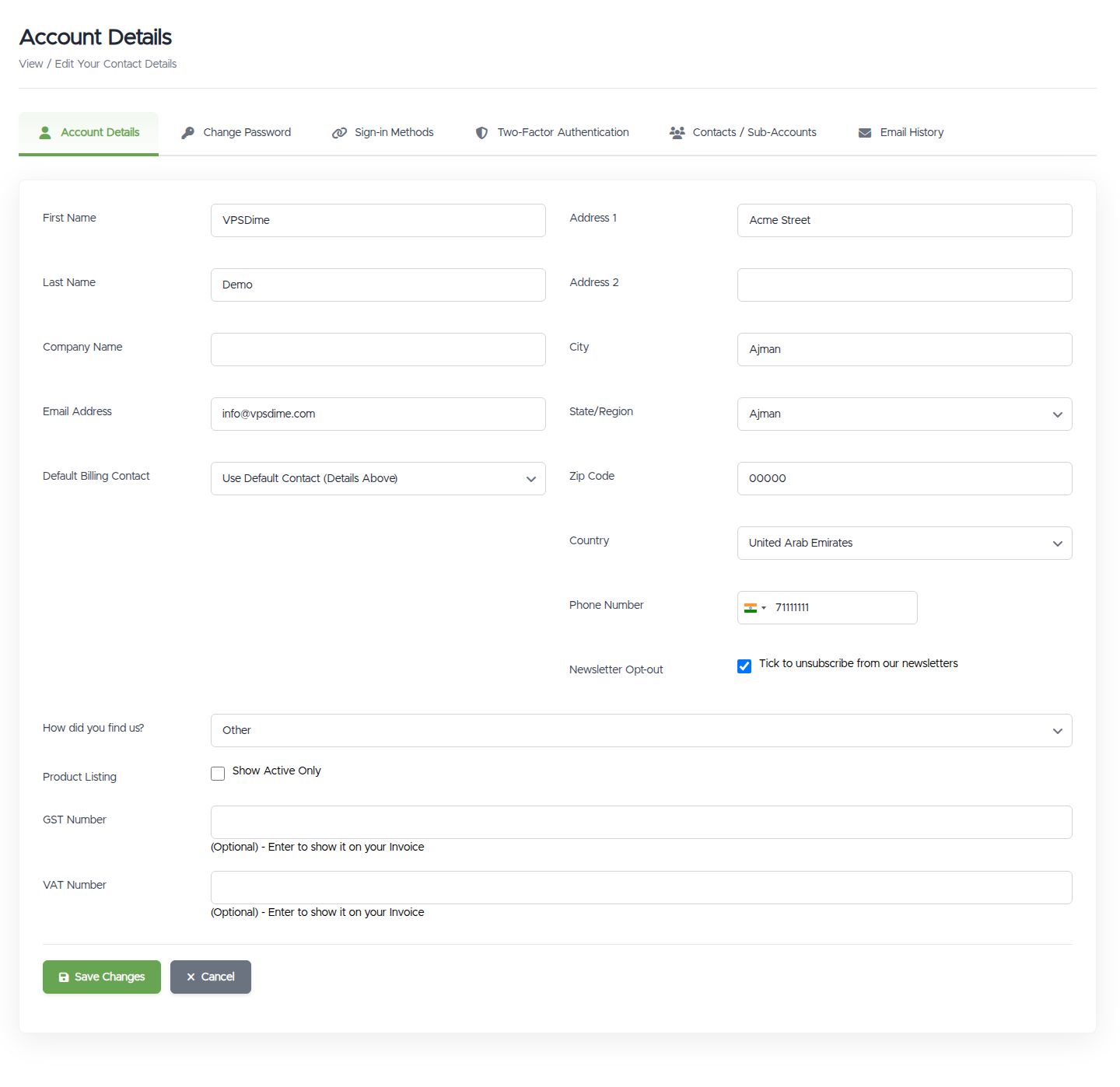
- The usual contact fields: first/last name, company, email, address, city, state, postcode, phone.
- Default Billing Contact: pick which contact (if you've added any) receives invoices and billing emails. See Contacts & sub-accounts.
- Newsletter Opt-out: a checkbox to stop marketing/announcement emails. You'll still receive essential account, billing, and service emails.
- Product Listing - Show Active Only: a checkbox that hides cancelled and terminated services from your My Services list. It's the same setting as the Hide Cancelled Services button on that page, changing either one updates both.
- Some fields may appear greyed out / locked. These are set on our side and can't be self-edited.
- GST Number and VAT Number at the bottom, both optional. Enter either one and it will be shown on your invoices.
Things worth knowing
- Your email is also where your login codes go. If you change it here, future verification codes and all account emails go to the new address, so make sure it's an inbox you control. See Email login codes.
- Address changes don't update past invoices. A new billing address or company name applies to future invoices only; invoices already generated or paid keep the details they were issued with, they're records of what was billed at the time, not living documents. If you need an existing invoice reissued with corrected details (a company name for your accounting, a missing address line), open a ticket with the invoice number and what should change. The same goes for a VAT/GST number added after the fact, it appears on invoices from now on, not retroactively.
- Using a Default Billing Contact? Invoices carry the contact's details. When a billing contact is selected, invoices are issued with that contact's name, company, and address, not your main profile's. So if new invoices show details that look wrong or outdated, and editing this page changes nothing, the details live on the contact: edit them at Contacts / Sub-Accounts, or set Default Billing Contact back to None to use your main profile again.
- Tax IDs on invoices. Adding your GST Number or VAT Number here makes it show on your future invoices, which is handy for business and tax records. Both are optional. (To have tax removed from a payment, you also enter the number on the payment form at checkout, see Taxes.)
- Changing your password is a separate page. See Change password.
Troubleshooting
- A field is greyed out and I can't edit it. That field is locked on our side. Open a ticket and we'll update it for you.
- "A user already exists with that email address" when I change my email. That email is already on another account. Use a different address, or contact us if you think it's a mistake.
- I changed my email to the wrong address and now I'm not getting codes/emails. Contact us (below) and we'll help you correct it and regain access.
Still need help?
You can open a support ticket. So we can help on the first reply, it's worth mentioning:
- the email address on your account,
- which detail you're trying to change,
- a screenshot of the screen or any error.
Related questions
- "How do I update my account details?"
- "How do I change my email address?"
- "How do I stop marketing emails?"
- "What is a billing contact?"
- "How do I add my VAT or GST number to my invoices?"
- "I updated my address, why do old invoices still show the previous one?"
- "I changed my details but new invoices still show different information."
- "Can you reissue an invoice with my correct company details?"