
Reset a forgotten password
What this is
If you can't remember your password, you can reset it yourself from the sign-in page. We email you a link, and you set a new one. This is different from changing your password while you're already signed in: that needs your current password, this doesn't. Reset it at https://vpsdime.com/pwreset.
Steps
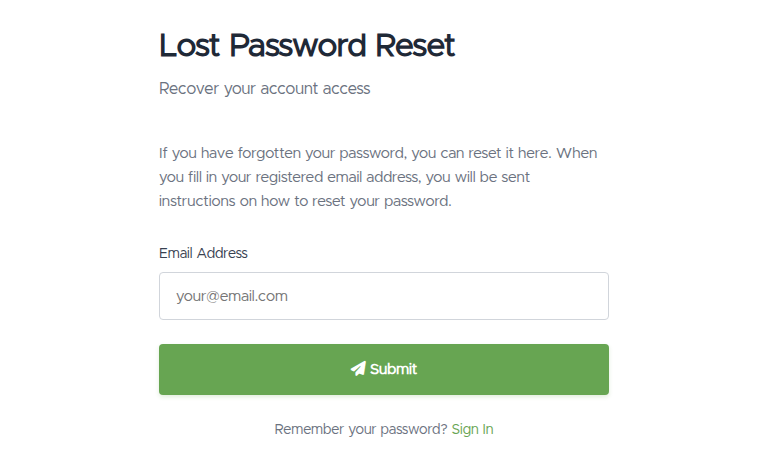
- On the sign-in page, click Forgot password?. This opens the Lost Password Reset page.
- Enter the email address on your account and click Submit.
- We email you instructions with a reset link. Open your inbox and click the link.
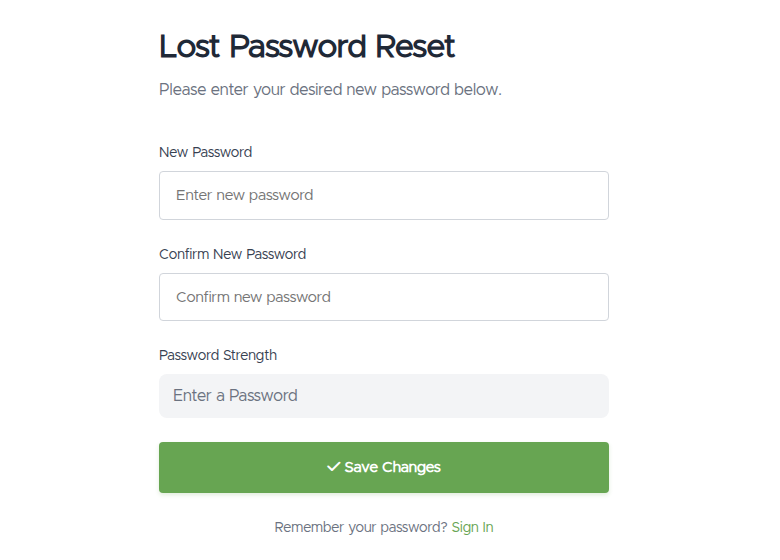
- On the page the link opens, enter your New Password, confirm it, and click Save Changes.
- You'll see "Password Updated!". Click Sign In to Your Account and sign in with the new password.
What you'll see
- The request page ("Lost Password Reset"): a short note, "If you have forgotten your password, you can reset it here. When you fill in your registered email address, you will be sent instructions on how to reset your password.", an Email Address field, and a Submit button.
- After you submit: a "Validation Email Sent" confirmation, "The password reset process has now been started. Please check your email for instructions on what to do next," and a Back to Login button.
- The reset link page: New Password and Confirm New Password fields with a Password Strength meter, and a Save Changes button.
- On success: a "Password Updated!" screen ("Password Reset Successful") with a Sign In to Your Account button.
- If the link is bad: an "Invalid Link" page ("Link Invalid or Expired") with a Request New Reset Link button.
Things worth knowing
- The reset link is time-limited and single-use. If you land on the Invalid Link page, the link has expired or already been used. Click Request New Reset Link and start again.
- Two-factor still applies. Resetting your password doesn't turn off two-factor authentication. After you sign in with the new password, you'll still be asked for your code (email or authenticator). See Two-factor authentication.
- Signed up with Google or GitHub? If you never set a password, there may be nothing to reset. Just sign in with Google or GitHub, or set a password from Sign-in Methods.
- If your account has a security question, you'll be asked it after entering your email, before the reset email is sent.
- Know your current password and just want to change it? Use Change password instead.
Troubleshooting
- The reset email didn't arrive. Give it a minute, then check your spam/junk folder. Make sure you used the exact email address on your account. Still nothing? Request the reset again.
- "Link Invalid or Expired." Reset links don't last forever and work only once. Click Request New Reset Link for a fresh one, and use the newest email.
- I don't have a password to reset (I use Google/GitHub). Sign in with your provider, or set a password from Sign-in Methods.
- My new password is rejected. Choose a stronger one: longer, with a mix of letters, numbers, and symbols.
- I no longer have access to the account's email. You can't receive the reset link without it. Contact us (below) so we can help you recover access.
Still need help?
You can open a support ticket. So we can help on the first reply, it's worth mentioning:
- the email address on your account,
- whether you're stuck on the request page, the email, or the new-password page,
- a screenshot of any error.
Never put your password in a ticket. We don't need it and will never ask for it.
Related questions
- "I forgot my password, how do I reset it?"
- "Where's the forgot password link?"
- "I didn't get the password reset email."
- "My reset link says it's invalid or expired."
- "I signed up with Google, how do I get a password?"