
Sign in with Google or GitHub
What this is
Instead of an email and password, you can sign in with your Google or GitHub account in one click. It works on the sign-in page, the sign-up page, and during checkout. There's no password to remember. Manage it at https://vpsdime.com/manageoauth.
Steps
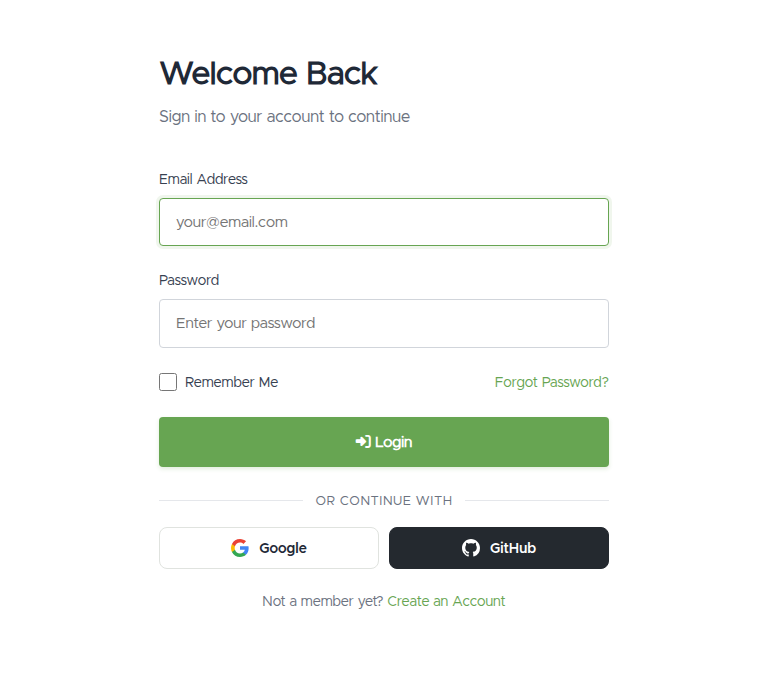
- On the sign-in (or sign-up) screen, click Sign in with Google or Sign in with GitHub.
- Approve the request on Google's / GitHub's page.
- You'll be brought back and signed in. The first time, see What you'll see below. There may be a quick one-time confirmation.
What you'll see
- First time, if you already have a VPSDime account with that email: for your security we email you a confirmation link. Open it and you'll land on a "Confirm your sign-in" page, then click the button there to link the provider and continue. (We do this so only the real account owner can attach Google/GitHub.)
- First time, with a new email (no account yet): you'll be taken to finish creating your account, pre-filled from your Google/GitHub profile, with "no password needed."
- Every time after that: one click signs you straight in. If you also use an authenticator app, you'll still be asked for that 6-digit code.
Troubleshooting
- "Your … email address is not verified." We only accept providers that have verified your email. Verify your email with Google/GitHub first, then try again.
- "Sign-in was cancelled or rejected by the provider." You closed or declined the approval screen. Click the button again and approve it.
- I didn't get the confirmation email. Check your spam folder. The link is valid for 30 minutes and opens a page with a Confirm button (clicking the link alone won't complete it, so press the button). If it expired, just start the sign-in again to get a fresh one.
- "This … account is already linked to a different account." That Google/GitHub identity is connected to another VPSDime account. Sign in to that one, or contact us if you've lost access.
- The email belongs to a different VPSDime account. You can't link a provider whose email is registered to someone else's account. Sign in to the correct account, or reach out below.
Still need help?
You can open a support ticket. So we can help on the first reply, it's worth mentioning:
- the email address on your Google/GitHub account,
- which provider you're using (Google or GitHub),
- the exact message you see (a screenshot is ideal).
Related questions
- "How do I sign in with Google / GitHub?"
- "I clicked the confirmation email but it didn't work."
- "Can I log in without a password?"
- "It says my account is already linked somewhere else."