
Backup codes
What this is
A backup code is a one-time code that lets you sign in if you ever lose access to your authenticator app. You're shown one when you set up the app, and a fresh one each time you use it. Keep it somewhere safe and separate from your phone. Manage it at https://vpsdime.com/2fa.
Backup codes apply when you're using an authenticator app. (On email login codes, your recovery is simply your email inbox.)
Steps
Using a backup code to sign in
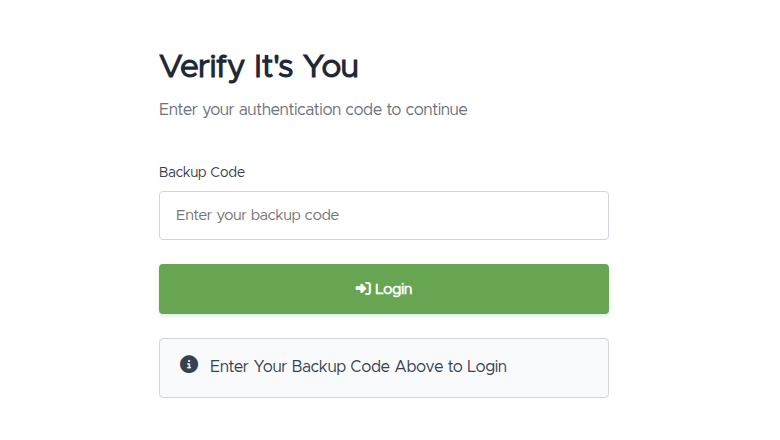
- Sign in with your password (or Google/GitHub). On the "Verify It's You" screen, choose the option to sign in with a backup code instead of the app.
- Enter your saved backup code.
- You're signed in. We immediately replace the used code and show you a new one on a "Save your new backup code" screen, so write it down before continuing.
Getting a fresh code any time
- Go to My Account → Two-Factor Authentication and click Regenerate backup code. You'll confirm your password, and we'll show the new code once.
What you'll see
- During app setup, a "Save your backup code" box: "Store it somewhere safe. It won't be shown again."
- After using one to sign in, a "Save your new backup code" screen with the replacement and an I've saved it, continue button.
- A backup code is four short groups, e.g.
abcd 1234 ef56 7890.
Troubleshooting
- My backup code didn't work. Backup codes are single-use. If you've already used it, the old one no longer works, so use the newest one we showed you afterward. Spaces don't matter, but make sure you're using the most recent code.
- I lost both my phone and my backup code. You'll need our help to safely restore access. See I can't sign in and open a ticket below.
- I want a fresh code but don't remember setting one up. If you're on email login codes (not an app), there are no backup codes; your recovery is your email. See Two-factor authentication.
Still need help?
You can open a support ticket. So we can help on the first reply, it's worth mentioning:
- the email address on your account,
- whether you still have your authenticator app or have lost it,
- a screenshot of the screen you're stuck on.
Related questions
- "How do I use a backup code?"
- "I lost my phone, how do I get in?"
- "How do I get a new backup code?"
- "My backup code isn't working."