
Extra Features (add-ons)
What this is for
The Extra Features tab (in Manage VPS, https://vpsdime.com/myservices) adds resources to your VPS one at a time, without moving to a whole new plan. If you only need more of one thing (disk, CPU, bandwidth, or an IP), this is usually simpler than a full upgrade. Add-ons stack on top of your plan and appear on your regular invoice going forward.
How adding and removing works
- Add: click Buy Now (or pick a quantity) on the feature. Due Now is prorated, you pay only for the days left in your current billing term. Then Pay Invoice, and it's applied. Going forward it's included on your renewal at its normal rate.
- Remove: click Remove to drop an add-on. Per the Downgrade Policy shown on the tab, removed features aren't refunded or credited, you're simply billed less from the next cycle. So add what you need, but don't expect money back for removing it mid-term.
- Cancel a pending add-on: if you clicked Buy Now but haven't paid, you can Cancel the pending order (its invoice is cancelled too), and re-order any time.
The add-ons, and when to use each
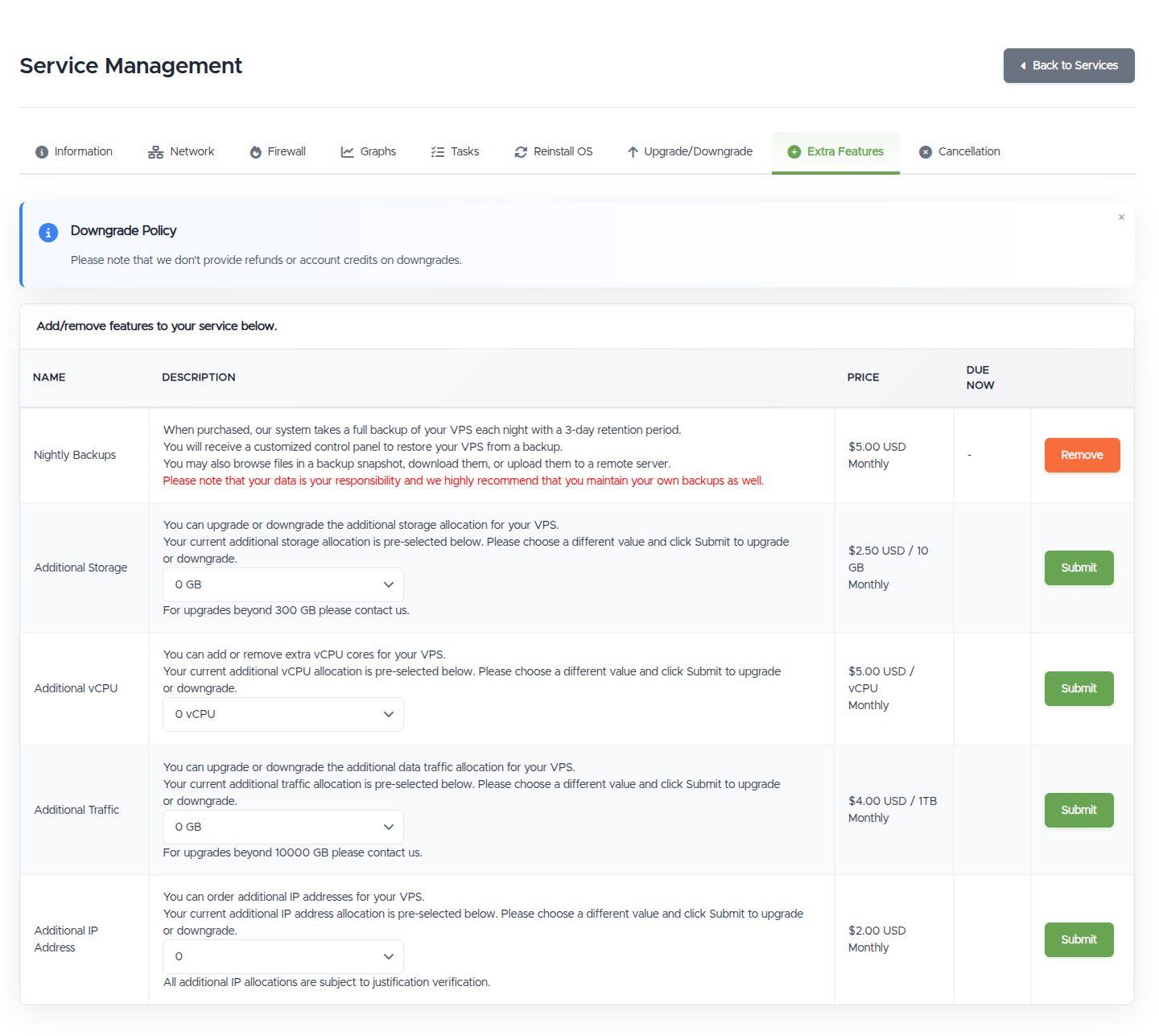
Use the Graphs to decide which (if any) you actually need, add the one that's constrained, not more plan than you'll use.
- Nightly Backups. A nightly off-server backup of your whole VPS with self-service restore. Highly recommended if the data on the VPS matters. It's an add-on on Linux VPS and included free on Premium VPS. Full details in Nightly Backups, and how to turn it on.
- Additional Storage. More disk space. Add this when you're running low on storage but CPU and RAM are fine, cheaper and simpler than jumping to a bigger plan just for disk. Removing it shrinks your disk, so, just like a plan downgrade, your data has to fit in the reduced space: if your usage is close to (or above) what's left after removal, the removal is blocked until you free up space (you need a couple of GB free afterward). Delete or move data off first, then remove the add-on.
- Additional vCPU. More CPU cores. Add this when your CPU graph is consistently pinned during normal use and you don't need more of anything else.
- Additional Traffic. More monthly bandwidth. Add this if you're heading over your traffic allowance, or your VPS was suspended for a traffic overage, rather than upgrading the whole plan.
- Additional IP Address. Extra IPv4 addresses at $2/month each, for example to run multiple sites with their own IP/SSL, or separate services. Extra IPs are subject to a short justification (we may ask what you need it for). To set reverse DNS on a new IP, use the Network tab.
Add-on vs upgrading the plan
- Add-ons are best when one resource is tight.
- If several are tight at once (CPU and RAM and disk), a plan upgrade is usually better value and less fiddly.
Good to know, and troubleshooting
- It asked me to pay an invoice. That's expected, the add-on activates once the prorated invoice is paid. See Viewing and paying an invoice.
- I don't want to be charged again, will removing refund me? No, removing stops future charges but doesn't refund the current term.
- My extra IP request is asking for justification. That's normal for IPv4, tell us briefly what it's for and we'll sort it.
- I only need more disk but the plan upgrade adds CPU/RAM too. Use Additional Storage here instead.
- I can't remove Additional Storage, or it's blocked. Removing it reduces your disk, and your data still has to fit. Free up space so there's a couple of GB clear after the removal, then try again, the same rule as a plan downgrade.
Still need help?
You can open a support ticket. So we can help on the first reply, it's worth mentioning:
- the VPS hostname or IP,
- which add-on you want (and how much),
- any invoice number involved.
Related questions
- "How do I add more storage / CPU / bandwidth to my VPS?"
- "How do I get an extra IP address?"
- "How much does adding storage/vCPU/traffic cost, and is it prorated?"
- "If I remove an add-on, do I get a refund?"
- "Can I remove extra storage if my disk is nearly full?"
- "Should I add resources or upgrade my plan?"
- "How do I enable nightly backups?"