
Cancelling a VPS
What this is for
The Cancellation tab requests cancellation of a VPS: it stops renewing, and the server is shut down and removed. Use it when you're done with a server. This cancels one VPS, not your whole account, for that see Deleting your account.
Placed an order by mistake and never paid it? That's a different, simpler thing, not this tab. An unpaid order that hasn't been provisioned is cancelled from My Services with the Cancel button next to its Pending Payment status (or it auto-cancels after 3 days). This page is for a service you actually have.
Read this first: cancelling deletes your data
Cancelling a VPS permanently deletes it and everything on it, and there's no undo once it's processed. Before you cancel, download or back up anything you want to keep. If you have Nightly Backups, note that those go away with the service too, so grab what you need first.
Immediate vs End of Billing Period
When you request cancellation you choose when it happens:
- End of Billing Period (usually the better choice). The VPS keeps running until the end of the term you've already paid for, then cancels automatically. Since unused time isn't refunded, you may as well use what you've paid for.
- Immediate. The VPS is cancelled and its data deleted shortly after you submit (within about 12 hours), with no undo. Choose this only if you want it gone now and have your data off it.
Either way, cancelling on its own doesn't refund the remaining time. If you're within the 72-hour money-back window of a new order, see Refunds.
How to cancel
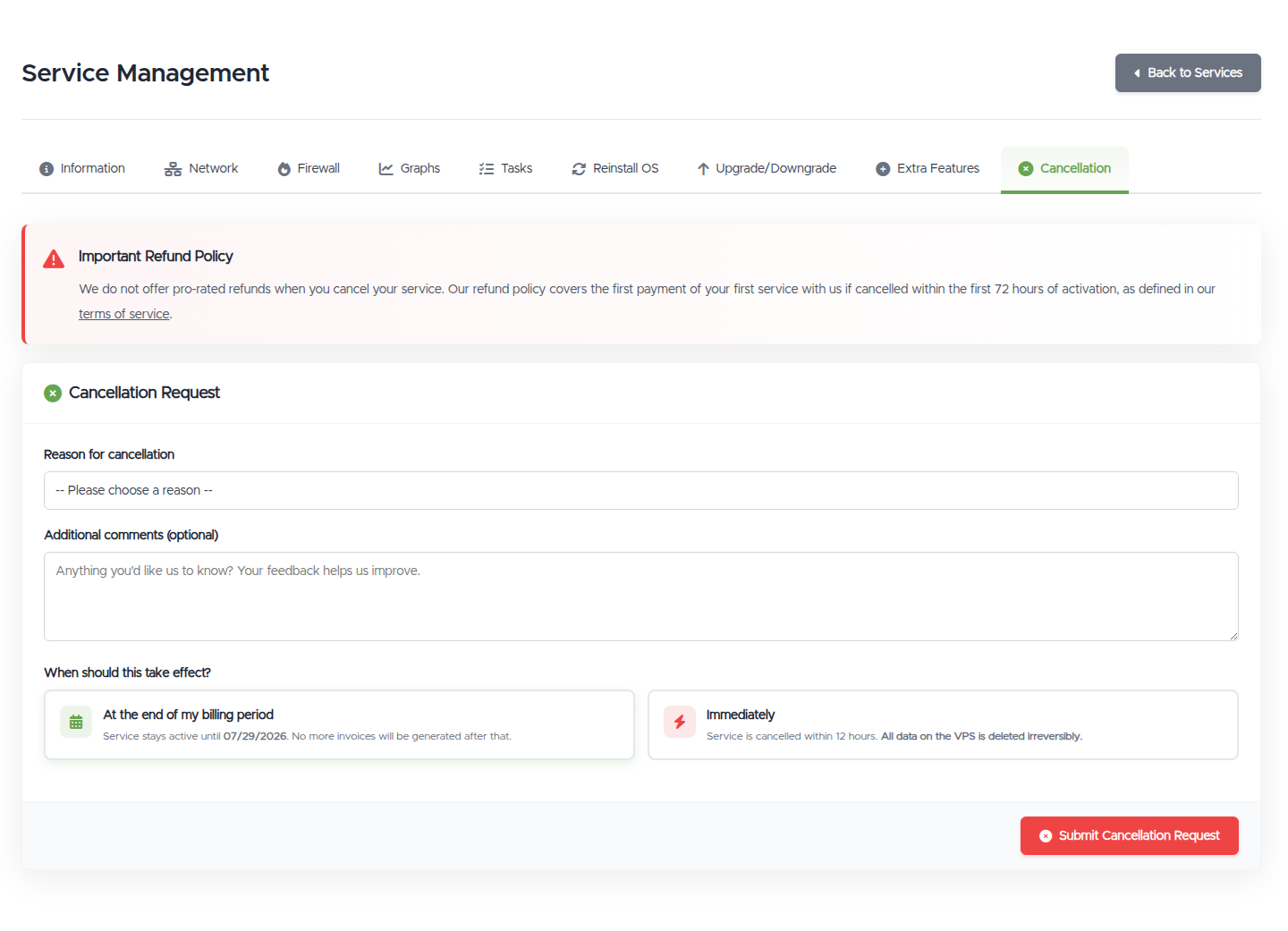
- Open Manage VPS (via https://vpsdime.com/myservices), then the Cancellation tab.
- Pick a reason from the dropdown (and add any comments if you like, they're optional).
- Choose At the end of my billing period or Immediately, then click Submit Cancellation Request.
Changed your mind? Revoke it
If a VPS is set to cancel, you'll see a banner with the date. You can revoke the cancellation from the same Cancellation tab any time before it takes effect, and the VPS carries on as normal.
Switching between Immediate and End of Billing Period
Picked the wrong timing? There's no edit button, but the same two steps get you there: revoke the existing request on the Cancellation tab, then submit a new one with the timing you meant, for example, revoke an Immediate request and resubmit choosing At the end of my billing period. Works in either direction.
One urgency note: an Immediate request is processed within about 12 hours of submission, and once it's processed, the VPS and its data are gone, there's nothing left to switch. If you submitted Immediate by mistake, do the revoke-and-resubmit now, not later today.
Suspended for non-payment? The tab still works
A service that's been suspended for an unpaid invoice can still be cancelled: the Cancellation tab stays available on its manage page, suspension takes the VPS offline, not your ability to end the service. And submitting an Immediate cancellation there also cancels the unpaid invoice for that service, so nothing remains to pay and no further charges follow. If you've decided you're done with a suspended VPS, this is the clean exit: cancel it rather than letting it sit until termination with an invoice hanging over it.
One caution before you do: a suspended VPS still has its data until it's cancelled or terminated, and an Immediate cancellation deletes it. If there's anything on it you want, ask us for a 24-hour unsuspension to back up first, then cancel.
Good to know
- Cancelling vs not paying. Cancelling is you choosing to end the service cleanly. If you just stop paying instead, the VPS is suspended and then terminated on our billing schedule, so cancelling on End of Billing Period is the tidy way to stop.
- No need to cancel anything on the payment side. Our system only charges for active services, so once a VPS is cancelled (or has a cancellation request in), its automatic renewal stops with it. You don't have to cancel a PayPal billing agreement, subscription, or saved card yourself, and you won't be charged for the cancelled service again.
- Cancelled or terminated means gone for good. Once a VPS is cancelled or terminated, its data cannot be restored, not from our side either. There is no grace copy behind the scenes; deletion is deletion.
- Backups go too. Restores rely on the service existing; once it's cancelled, its backups are gone.
- Data first. The most common regret is choosing Immediate before copying data off. When in doubt, pick End of Billing Period and get your data.
Still need help?
You can open a support ticket. So we can help on the first reply, it's worth mentioning:
- the VPS hostname or IP,
- whether you want it cancelled immediately or at the end of the period,
- and if it's about a refund, when you ordered it.
Related questions
- "How do I cancel my VPS?"
- "What's the difference between immediate and end-of-billing-period cancellation?"
- "Will I get a refund if I cancel?"
- "Will cancelling delete my data?"
- "I set my VPS to cancel by mistake, how do I undo it?"
- "Does cancelling one VPS close my whole account?"
- "Do I need to cancel my PayPal subscription when I cancel my VPS?"
- "Will I still be charged after cancelling my service?"
- "My VPS shows as Terminated or Cancelled, is my data gone?"
- "Can you restore my cancelled VPS's data?"
- "Can I cancel a VPS that's suspended for non-payment?"
- "If I cancel a suspended service, do I still owe the unpaid invoice?"
- "I chose Immediate cancellation but meant end of billing period, how do I change it?"