
Automatic renewals (subscriptions)
What this is
By default your services renew manually: we email you an invoice each cycle and you pay it. If you'd prefer not to pay each invoice by hand, you can set a service to renew automatically. You manage this at Billing, Manage Subscriptions. Find it at https://vpsdime.com/managesubscriptions.
The three ways a service can auto-renew
Automatic renewal runs through one of three separate systems, each set up in a different place:
- Card on file: a card you save with us. Set up and managed under Saved cards. On the subscriptions page it shows as Saved Card.
- Paddle subscription: created when you pay an invoice with PayPal / Card and choose Subscribe, or when you click Make Automatic with no saved card. Shows as Paddle PayPal or Paddle Card.
- Fastspring subscription: created when you pay with Alternative PayPal (Fastspring) as a subscription. Shows as Fastspring PayPal or Fastspring Card.
A service uses one of these at a time. The saved card is managed on the Saved cards page; Paddle and Fastspring subscriptions are managed here.
What you'll see
On Billing, Manage Subscriptions:
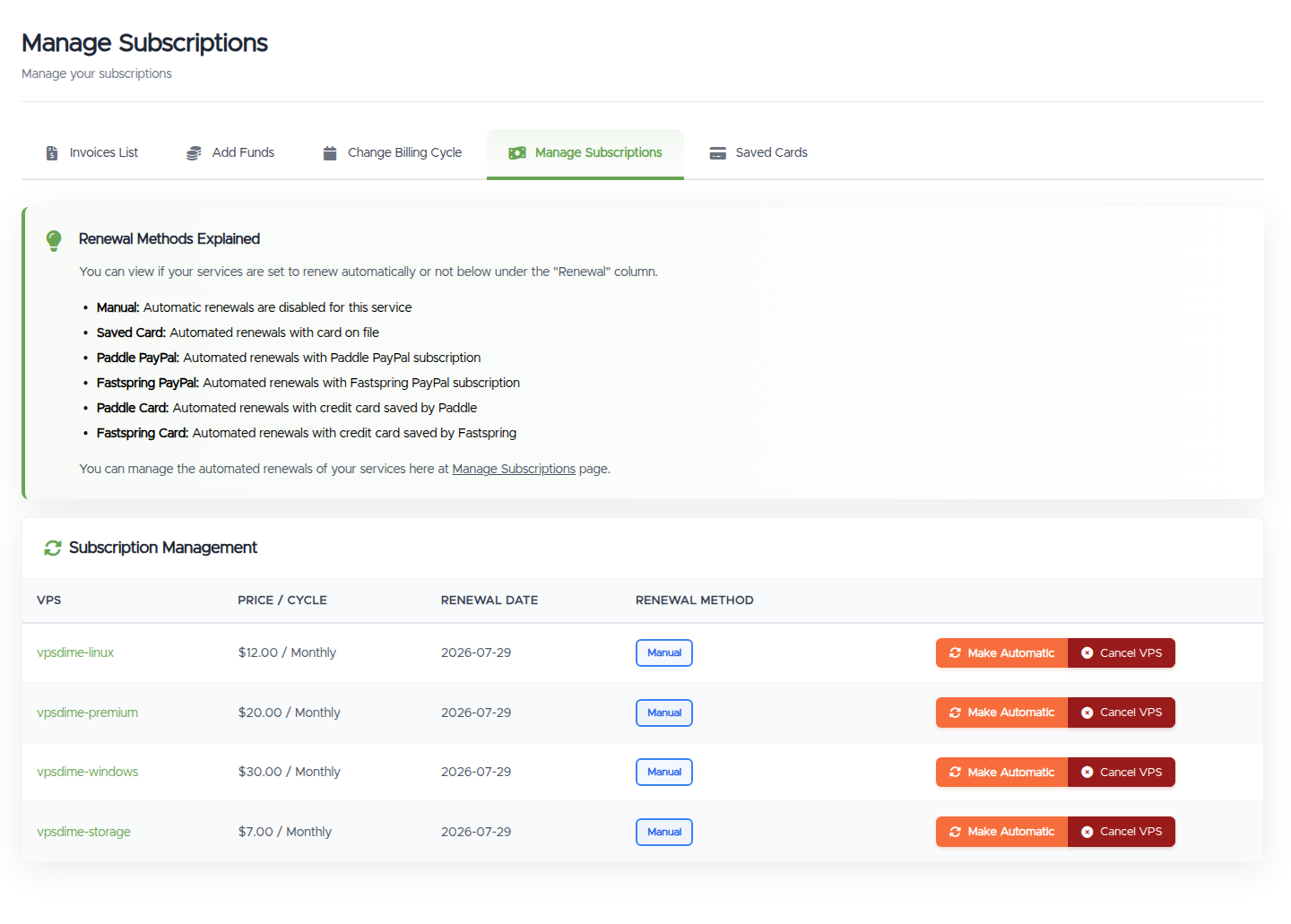
- A Renewal Methods Explained key:
- Manual: automatic renewals are off for this service
- Saved Card: renews with your card on file
- Paddle PayPal / Paddle Card: renews via your Paddle subscription
- Fastspring PayPal / Fastspring Card: renews via your Fastspring subscription
- A table of your services with VPS, Price / Cycle, Renewal Date, and Renewal Method.
- The buttons on each row depend on the current method:
- Manual: Make Automatic and Cancel VPS
- Saved Card or Paddle: Manage, Make Manual, and Cancel VPS
- Fastspring: Make Manual and Cancel VPS
Turning auto-renewal on
- Click Make Automatic on a manual service. With no saved card, this sets up a Paddle subscription where you pick card or PayPal on the Paddle checkout page. With a saved card, it takes you to assign that card to the service.
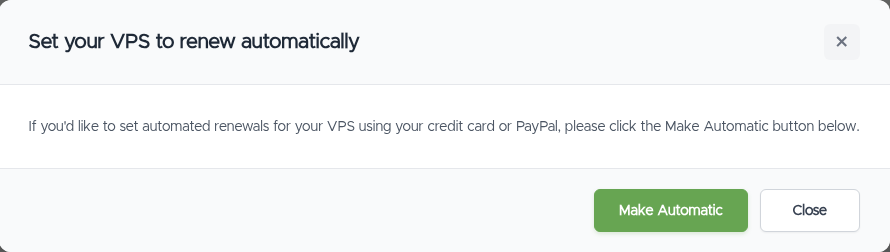
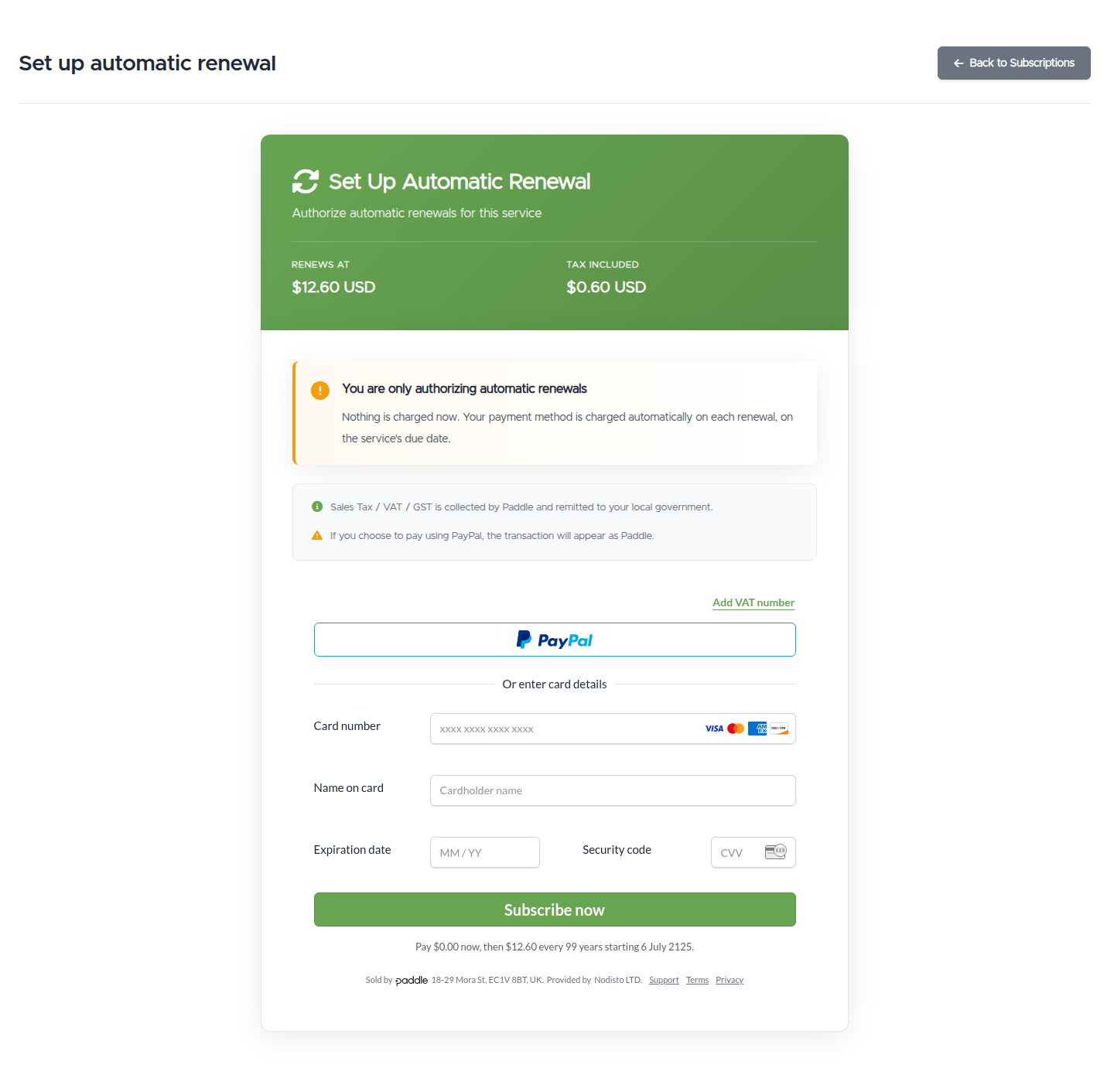
- Or, when you pay an invoice with PayPal / Card, choose Subscribe instead of Pay Once. See Viewing and paying an invoice.
- To renew with a saved card, add one under Saved cards.
Changing or updating your payment method
Use the Manage button next to a service. What you can change depends on the method:
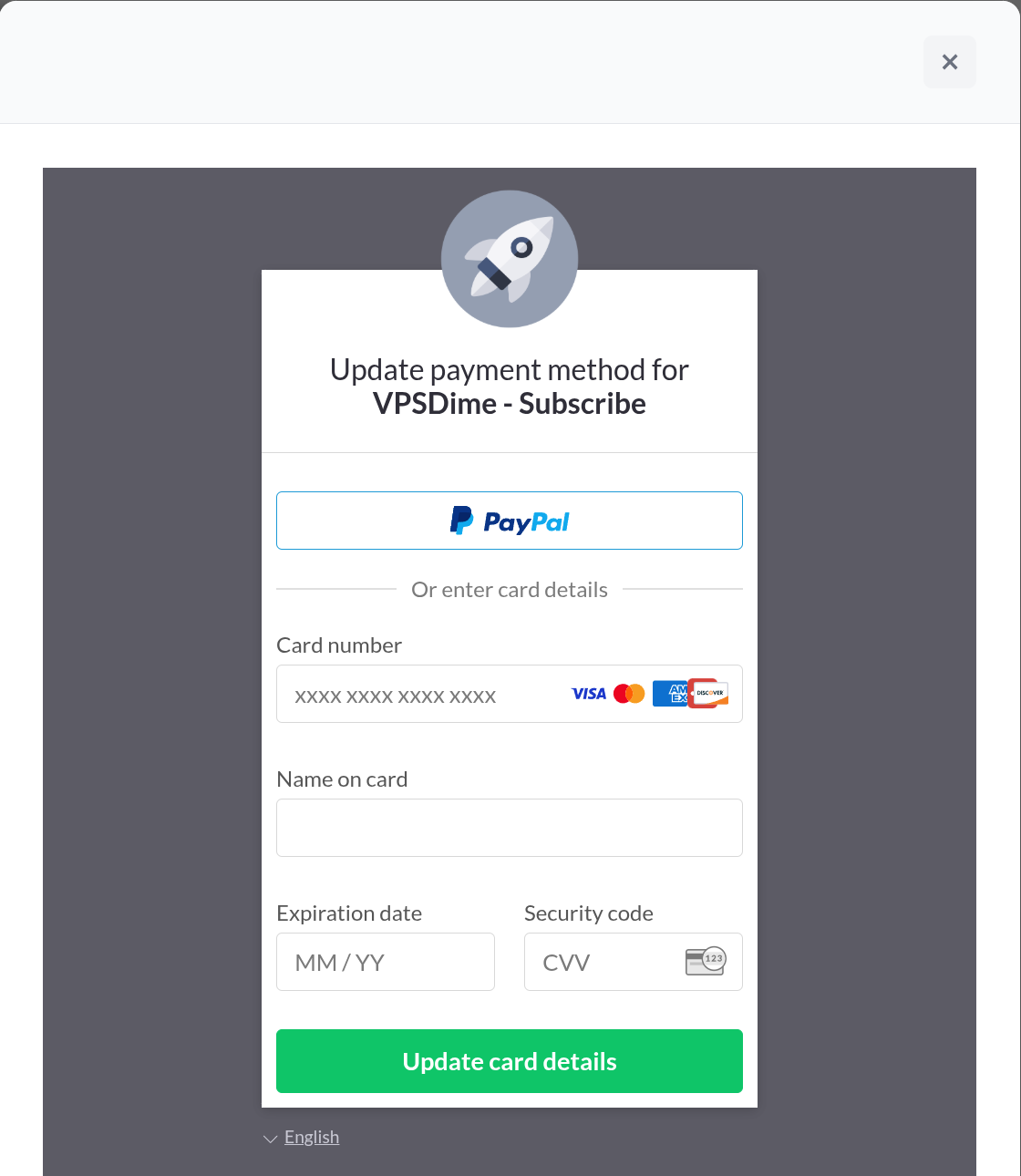
- Paddle subscription: Manage opens Paddle's management window.
- On Paddle Card, you can update your card details or switch to PayPal.
- On Paddle PayPal, you can switch to a credit card.
- Saved card: Manage takes you to Saved cards, where you add, remove, or reassign a card.
- Fastspring subscriptions don't have an in-page Manage option. To change one, set the service to Manual and set up auto-renewal again with the method you want, or open a ticket.
Turning auto-renewal off
- Click Make Manual on the service. We stop charging automatically, and you pay each invoice yourself when it's due. The service keeps running.
- If your auto-renewal is a saved card, you can also remove or unassign the card under Saved cards.
Things worth knowing
- When the charge happens: automatic renewals are charged on the service's renewal date (the date in the Renewal Date column), not days in advance, whichever renewal method is in use.
- Turning off auto-renewal is not the same as cancelling. Make Manual keeps the service running (you just pay invoices yourself). Cancel VPS ends the service. Use Cancel VPS only if you actually want the VPS gone.
- Paying early won't double-charge. If a service is set to auto-renew and you pay its invoice manually before the renewal date, we won't charge again for that same period.
- Switching systems (for example from a saved card to a Paddle subscription) means setting the current one to Manual or removing the saved card first, then setting up the new one.
- Cancelling a VPS stops its automatic charges by itself. We only charge for active services, so a cancelled service (or one with a cancellation request in) isn't charged again. You don't need to set it to Manual or cancel anything on PayPal's side first.
Troubleshooting
- My service renewed on a card or PayPal I didn't expect. Check the Renewal Method column to see which system is active. Saved-card renewals are managed under Saved cards; Paddle and Fastspring under Manage Subscriptions.
- I want to switch my Paddle subscription from card to PayPal (or back). Use Manage on that service and follow the Paddle window.
- I turned off auto-renew but still got an invoice. That's normal. Manual means we invoice you and you pay it; the invoice itself isn't an automatic charge.
- I want to stop renewals but keep my VPS. Use Make Manual, not Cancel VPS.
Still need help?
You can open a support ticket. So we can help on the first reply, it's worth mentioning:
- the VPS (hostname or IP) you mean,
- whether you want to turn auto-renewal on or off, or change the payment method,
- the renewal method currently shown for it.
Related questions
- "How do I make my VPS renew automatically?"
- "How do I stop automatic renewal without cancelling my VPS?"
- "How do I change my payment method or switch from card to PayPal?"
- "What's the difference between a saved card and a subscription?"
- "Why did my service renew through Paddle or Fastspring?"
- "When will my card or PayPal be charged for renewal?"