
DNS Manager
What this is
The DNS Manager is free DNS hosting for your domains, so you can point a domain at your VPSDime VPS without a separate DNS provider. You add your domain, set your registrar's nameservers to ours, and manage the records here.
It's free and provided for convenience, with no uptime guarantees. Open it from DNS in the client area sidebar (https://vpsdime.com/dnsmanager).
To use it you need a domain (registered with any registrar) and a VPSDime VPS to point it at. Our nameservers are:
- dns1.vpsdime.com
- dns2.vpsdime.com
Add a domain
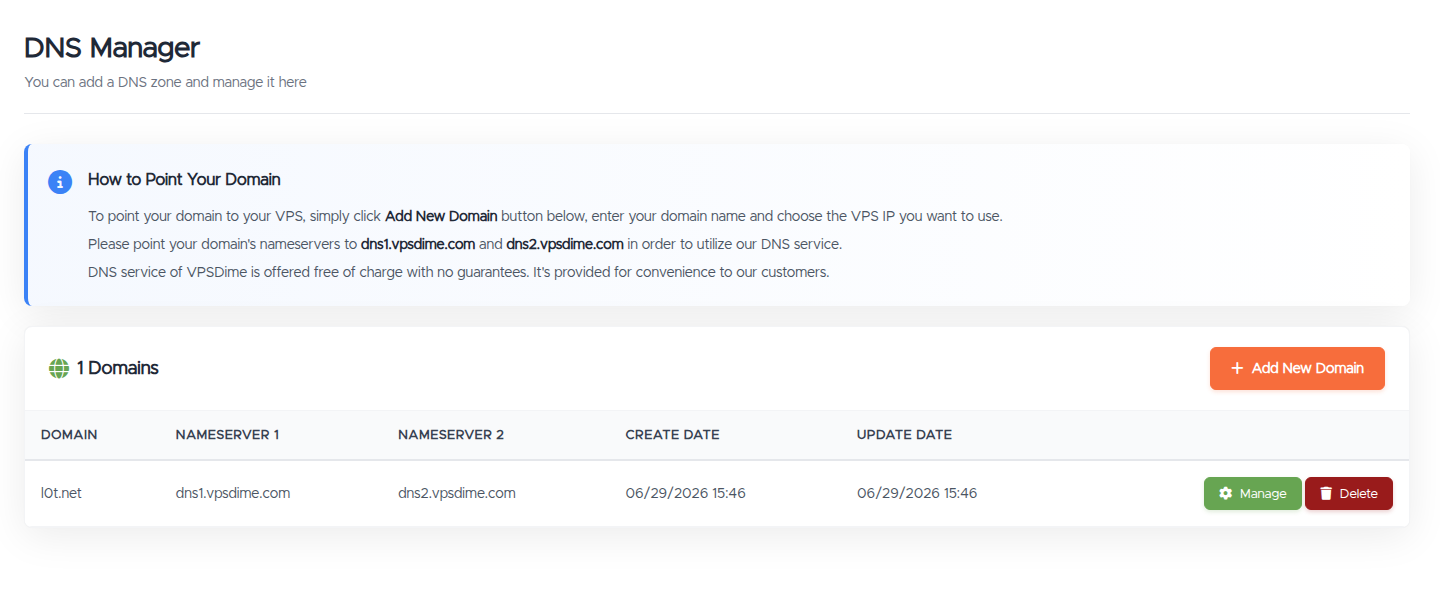
- Go to DNS and click Add New Domain.
- Enter your domain. Use the root domain (for example
example.com), not a subdomain. You can't add a subdomain as its own domain here. Add the root domain, then create records for subdomains inside it. - Choose the VPS IP to point it at, from the list of your services.
- Click Submit.
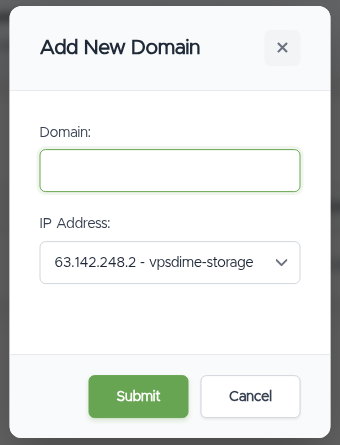
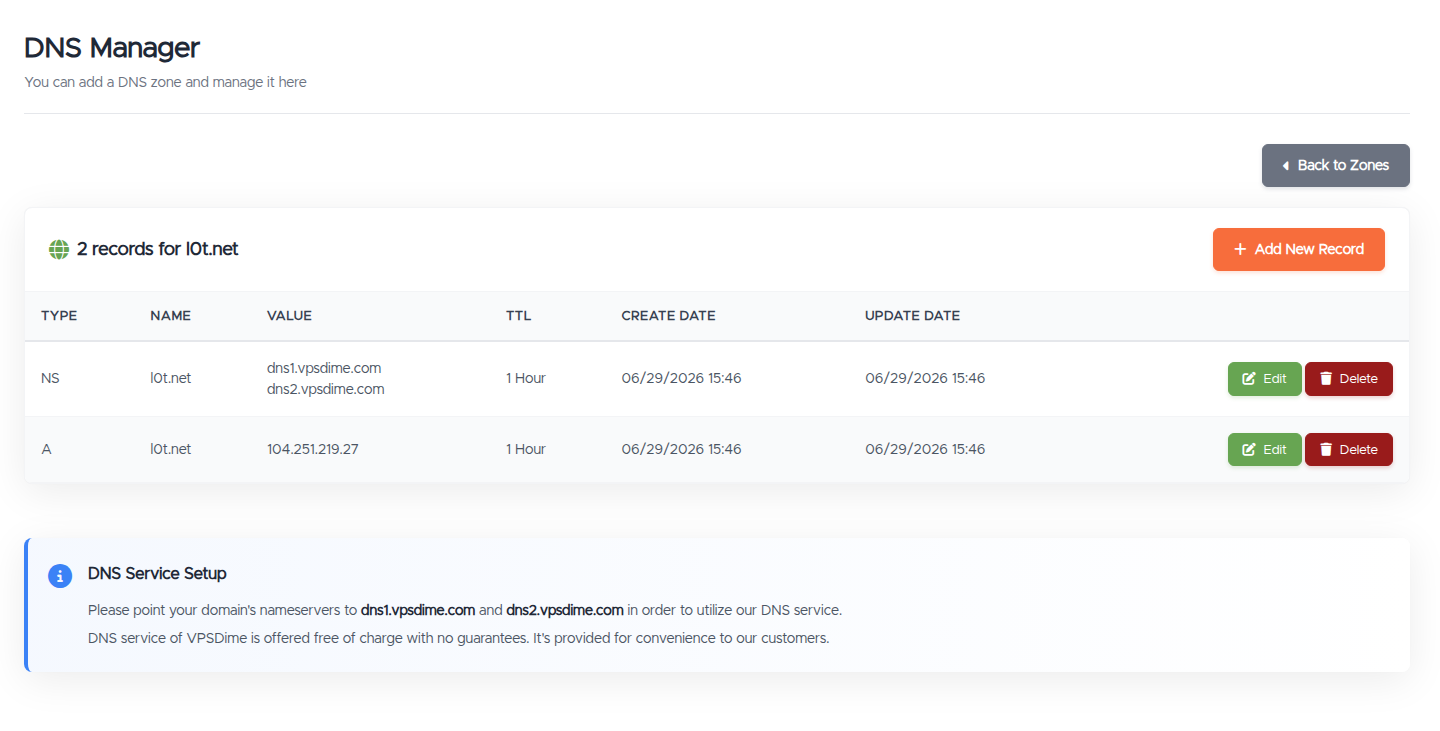
This creates the zone with NS records (dns1/dns2.vpsdime.com) and an A record pointing your domain at the VPS IP you chose.
Point your domain's nameservers
Adding the domain here doesn't make it live on its own. At your registrar (where you bought the domain), set the domain's nameservers to:
- dns1.vpsdime.com
- dns2.vpsdime.com
Until you do this, your records here won't take effect. Nameserver changes at a registrar can take up to 24 to 48 hours to propagate worldwide.
Manage records
Click Manage on a domain to open its records. Each record shows its Type, Name, Value, TTL, and dates, with Edit and Delete buttons. Use Add New Record to create one.
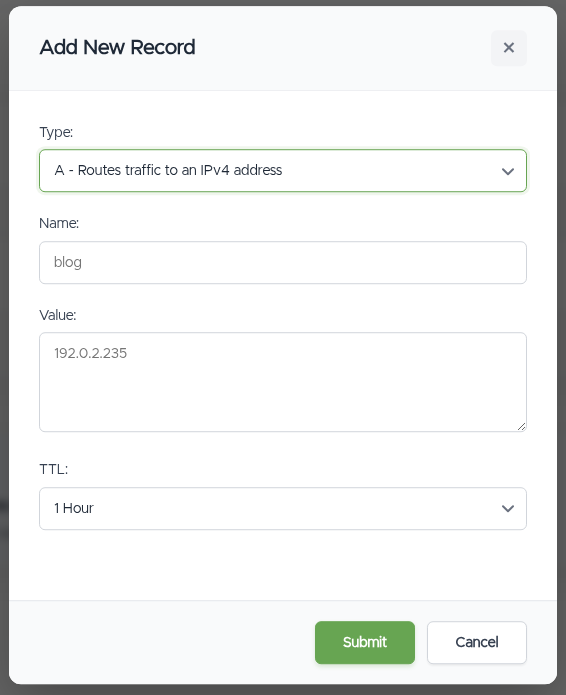
A record has four fields:
- Type: the kind of record (see below).
- Name:
@means the domain itself (the root). For a subdomain, enter just the label, for examplewwworblog. - Value: the record's target, which depends on the type.
- TTL: how long resolvers cache the record before checking again. Options are 5 Minutes, 1 Hour, 2 Hours, 6 Hours, 12 Hours, and 1 Day. A shorter TTL makes changes take effect sooner but is queried more often.
Record types
- A routes a name to an IPv4 address. Example value:
192.0.2.235. - AAAA routes a name to an IPv6 address. Example value:
2001:0db8::8a2e:0370:bab5. - CNAME points one name at another name (an alias). Example: Name
www, Valueexample.com. - NS sets the nameservers for the zone. Example value:
dns1.vpsdime.com. - MX sets your mail servers. The value is a priority then the mail server, for example
10 mail.example.com.(a lower priority number is tried first). - TXT holds text values, used for things like SPF, DKIM, DMARC, and domain verification. Example value:
"v=DMARC1;p=quarantine;pct=100". - SRV points a service to the server that provides it (used by SIP, XMPP, and some game servers). The Name is
_service._protocol, for example_sip._tcp, and the value is priority weight port target, for example10 5 5060 sip.example.com. - CAA controls which certificate authorities are allowed to issue certificates for your domain. The value is flags tag value, for example
0 issue letsencrypt.org(use tagissue, orissuewildfor wildcard certs).
Record changes within a zone take effect within the record's TTL, since resolvers may have the old value cached until then.
Email authentication (SPF, DKIM, DMARC)
Email records are all TXT records. A few notes so they work first time:
- SPF goes on the root (
@) as a single TXT value, for examplev=spf1 include:_spf.example.com ~all. - DKIM goes on the selector name your mail provider gives you, for example Name
s1._domainkey(enter the selector exactly as provided). Paste the whole key value your provider shows, including long 2048-bit keys, we store and serve it as one value. If your provider hands you the key already split into"..." "..."quoted parts, you can paste it that way too. - DMARC goes on Name
_dmarc, for examplev=DMARC1; p=quarantine; pct=100.
Delete a domain
Delete on the zones list removes the domain and all its records from our DNS. If your registrar's nameservers still point to dns1/dns2.vpsdime.com after that, the domain will stop resolving, so only delete it once you've moved DNS elsewhere or no longer need the domain to resolve.
Troubleshooting
- My domain isn't resolving. Check that your registrar's nameservers are set to dns1.vpsdime.com and dns2.vpsdime.com, and that you've added the right records here. After a nameserver change, allow up to 24 to 48 hours.
- "This domain name already exists." The domain is already in our DNS system (it may have been added before, or on another account). Open a ticket if you believe it shouldn't be.
- My record was rejected. Check the value matches the type: an A record needs a valid IPv4 address, an AAAA record a valid IPv6 address, an MX record needs a numeric priority before the mail server (for example
10 mail.example.com.), an SRV record needs a_service._protocolname and apriority weight port targetvalue, and a CAA record needs aflags tag value(for example0 issue letsencrypt.org). - My DKIM record isn't working. Enter the selector exactly as your mail provider gives it in the Name field (for example
s1._domainkey), and paste the full key in the Value field. Give the record its TTL to propagate, then re-check with your provider. - I changed a record but still see the old value. DNS is cached by TTL. Wait for the record's TTL to pass, and note your own network or resolver may cache longer.
- Is the DNS service guaranteed? No. It's free and provided for convenience, without an uptime guarantee. For critical setups you may prefer a dedicated DNS provider.
Still need help?
You can open a support ticket. So we can help on the first reply, it's worth mentioning:
- the domain involved,
- what you're trying to do (add a domain, point it to a VPS, or fix a record),
- the record type and value if it's about a specific record,
- any error you saw.
Related questions
- "How do I point my domain to my VPS?"
- "What nameservers do I use for VPSDime DNS?"
- "How do I add a domain to the DNS Manager?"
- "How do I add an A, MX, or TXT record?"
- "What's the format for an MX record?"
- "How do I add a DKIM, SPF, or DMARC record?"
- "How do I add an SRV or CAA record?"
- "Why isn't my domain resolving yet?"
- "How long do DNS changes take to apply?"
- "Is the free DNS service guaranteed?"