
Change your billing day
What this is
You can move a service's renewal to the day of the month that suits you, for example the 1st, or just after payday. You pay a small one-time invoice for the days added (the renewal always moves forward, never backward), and every future renewal stays on the new day. Find it at Billing, Change Billing Day (https://vpsdime.com/changebillingday).
This changes which day you're billed. To change how often you're billed (monthly, quarterly, annual), use Change your billing cycle instead.
Steps
- Go to Billing, Change Billing Day.
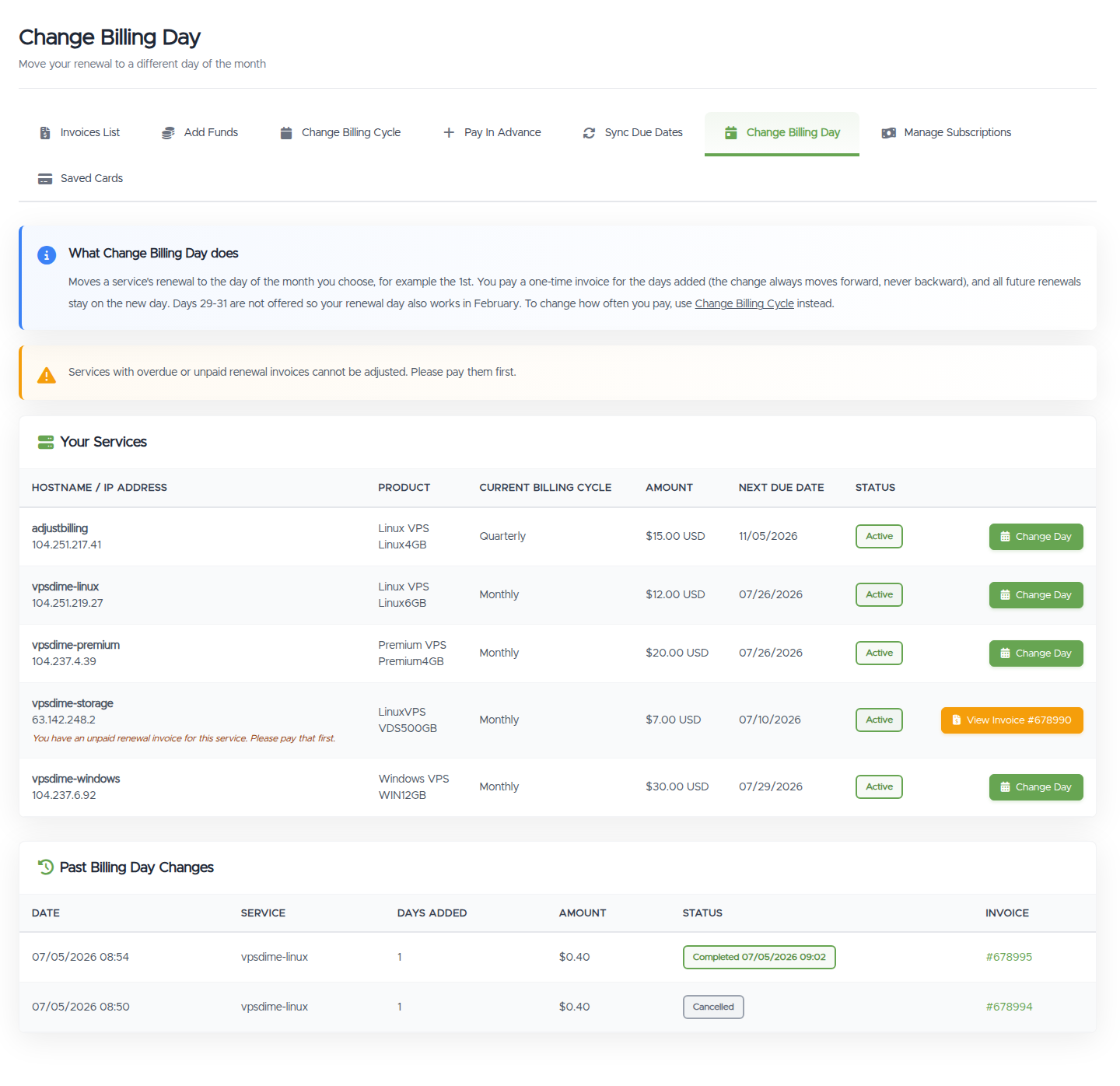
- Find the service in Your Services and click Change Day.
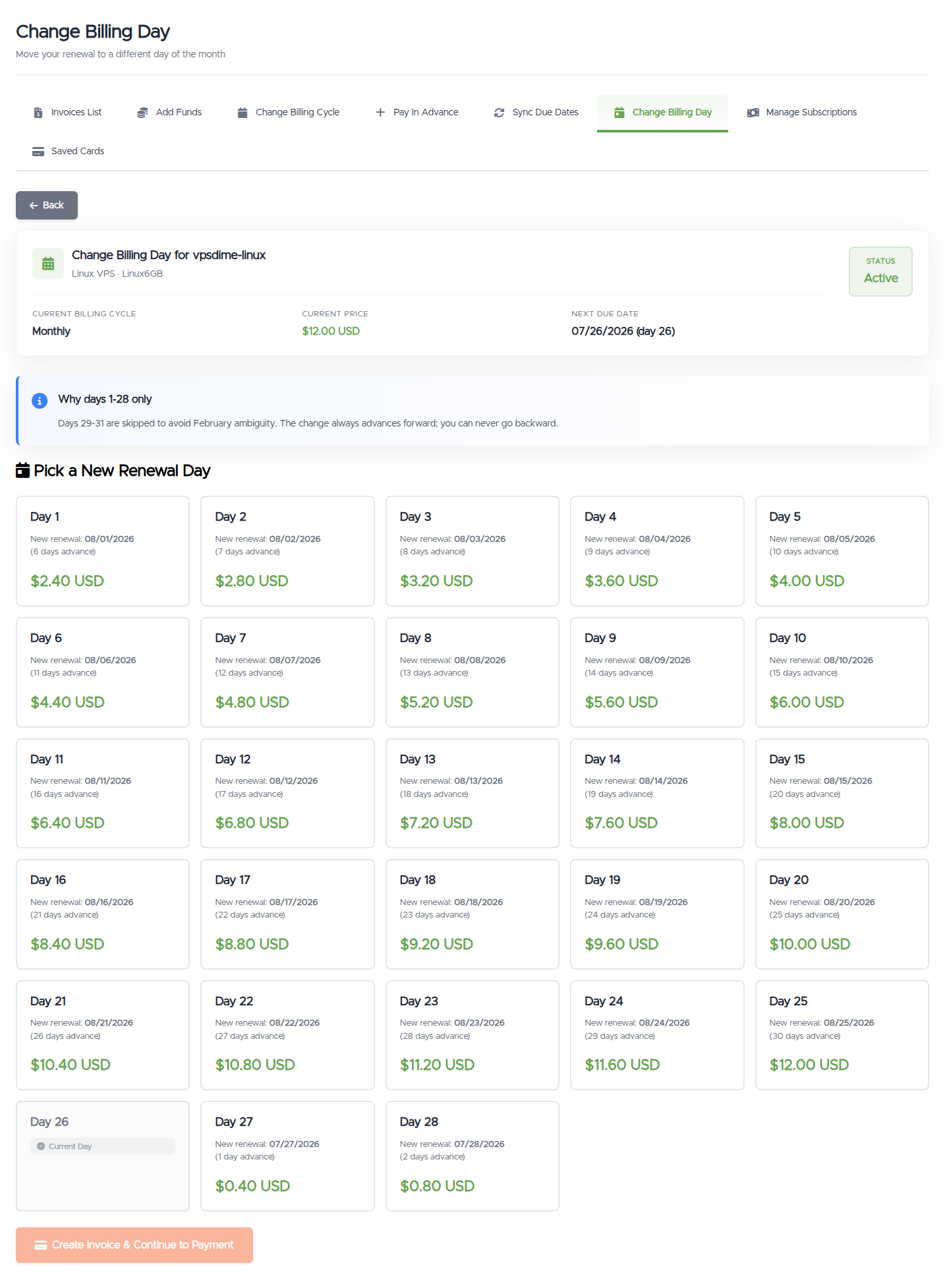
- Pick the new day of the month. Each option shows the new renewal date, the days added, and the exact price.
- Click Create Invoice & Continue to Payment and pay the invoice with any payment method, including account credit.
The renewal day changes the moment the invoice is paid. Nothing changes until then.
What you'll see
- A Your Services table with each service's cycle, price, and next due date, and a Change Day button per service.
- After choosing a service, a grid of days 1 to 28. Your current billing day is marked and the rest show the new renewal date and cost.
Things worth knowing
- Days 29 to 31 aren't offered so your renewal day also exists in February. Pick the 28th or the 1st if you want end-of-month or start-of-month billing.
- The change always moves forward. Choosing a day earlier in the month than your current one lands on that day in the next month; you pay for the extra days in between, at your plan's daily rate. The exact price is on each option card.
- The invoice is not charged automatically. Saved cards and PayPal subscriptions never auto-pay a billing-day invoice; pay it from the invoice page yourself.
- The offer expires if unpaid. An unpaid invoice cancels itself automatically after a few days (shown next to the pending entry). If it expires or you cancel, your renewal day stays as it is.
- One pending adjustment per service. A pending billing-day change blocks creating a prepayment or due-date sync for the same service until you pay or cancel it. Submitting a different day replaces the pending one.
- Several services to move to the same day? Sync your renewal dates does them all on one invoice.
Troubleshooting
- The button says View Invoice instead of Change Day. The service has an unpaid or overdue renewal invoice. Pay that first, then come back.
- My current day is not clickable. You're already billed on that day; there's nothing to change (and nothing to charge).
- My service isn't listed. Only Active, Pending, or Suspended services with a recurring billing cycle are shown. Free and one-time services have no renewal date to move.
- "Your renewal is due very soon." When the renewal is a day away or less, pay the upcoming renewal invoice first; you can change the day right after.
Still need help?
You can open a support ticket. So we can help on the first reply, it's worth mentioning:
- the service (hostname or IP),
- the day of the month you want,
- the invoice number if one was created.
Related questions
- "How do I get billed on the 1st of the month?"
- "Can I change my renewal day?"
- "How do I move my due date to after payday?"
- "Why can't I pick the 31st as my billing day?"