
Saved cards
What this is
A saved card is a card you store with us so a service can renew automatically from it. You manage saved cards at Billing, Saved Cards. This is one of the three auto-renewal options. See Automatic renewals for how it compares to Paddle and Fastspring subscriptions. Find it at https://vpsdime.com/managecards.
What you'll see
On Billing, Saved Cards:
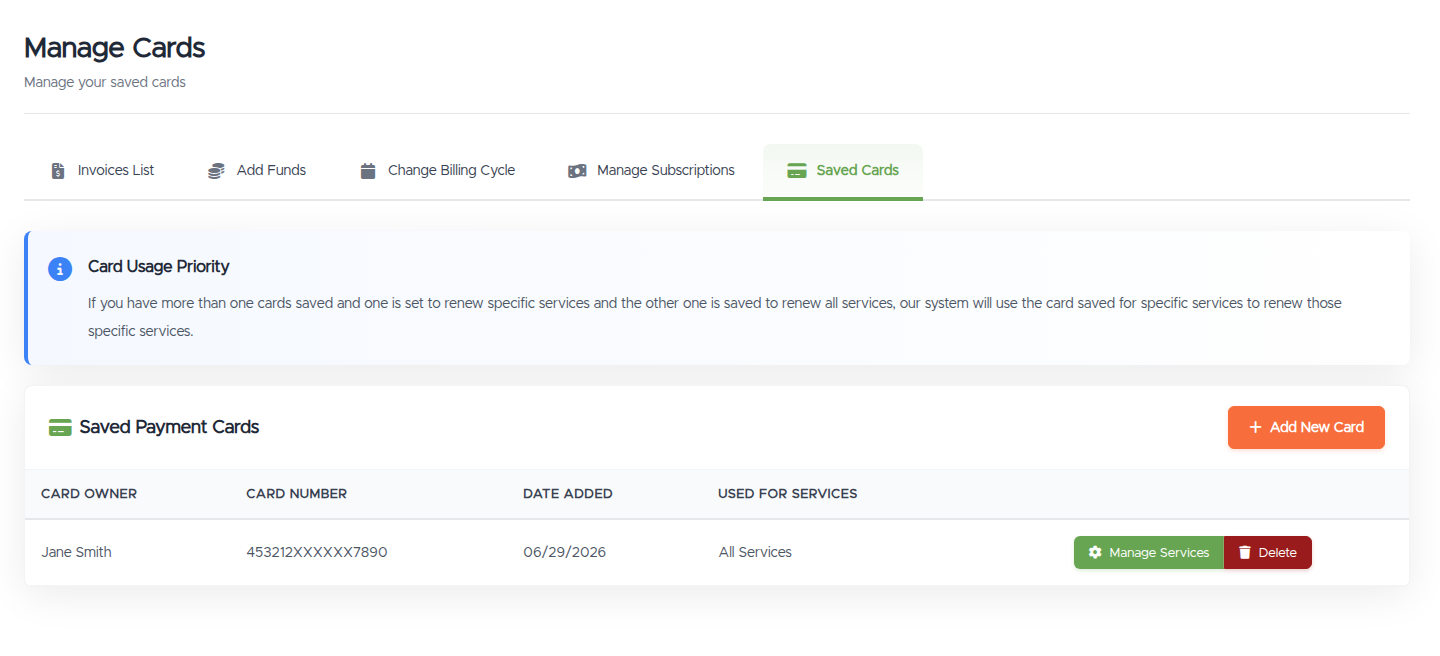
- An Add New Card button.
- A table of your saved cards: Card Owner, Card Number (masked), Date Added, and Used For Services.
- If you haven't saved any, an empty state: "No saved card found. Click here to add one."
Adding a card
Click Add New Card on the Saved Cards page to open the form. It has two parts:
- Billing Information: your name, address, and phone number (pre-filled from your account).
- Card Details: card type, card number, expiry date, and CVV.
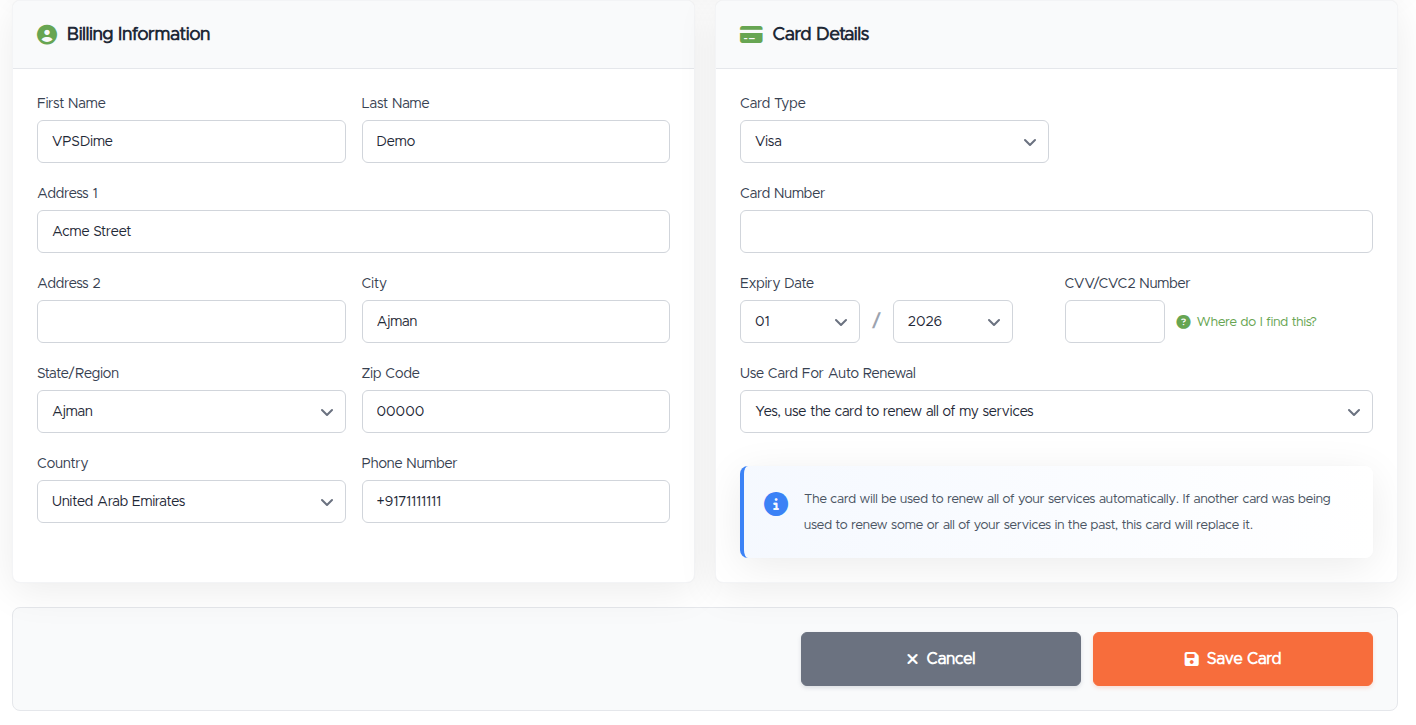
Then set Use Card For Auto Renewal:
- Renew all of my services with this card.
- Renew some services (you pick which ones from the list that appears).
- Save it for manual payments only (the card is stored for convenience but won't auto-renew anything).
Click Save Card when you're done.
Choosing which services a card renews
The Used For Services column shows what each card covers. A card can renew all your services, specific ones, or be saved for manual payments only (no auto-renewal).
- Card priority: if you have one card saved for specific services and another saved for all services, the specific-service card is used for those services, and the all-services card covers the rest.
Removing a card
Remove a card from the same page to stop it being used for renewals. If that card was the only thing auto-renewing a service, that service goes back to manual renewal and you'll pay its invoices yourself. See Automatic renewals.
If a saved-card charge fails
Your saved card is charged on the invoice's due date, never before it. If that charge is declined, we retry once a day on the following days. If you have several unpaid invoices, we attempt one of them per day; the others wait for the next day's run.
After three failed days in a row, we disable the card for automatic renewals and email you. To get back on track, pay any open invoice manually (see Viewing and paying an invoice) and check, update, or re-add your card.
Things worth knowing
- Saved cards are separate from Paddle and Fastspring subscriptions. A saved card here renews through our card processor and shows as Saved Card on the subscriptions page. Paddle and Fastspring subscriptions are set up while paying an invoice and are managed under Automatic renewals.
- Removing a card doesn't cancel the service. It just stops auto-renewal. The service keeps running until its next due date.
Troubleshooting
- My card was declined when I tried to save it. Try again or use a different card. If it keeps failing, your bank may be blocking it. Contact them, or use another auto-renewal method.
- A renewal didn't go through on my saved card. Pay the open invoice manually (see Viewing and paying an invoice), and check the card is still valid and assigned to that service.
Still need help?
You can open a support ticket. So we can help on the first reply, it's worth mentioning:
- which service the card should renew,
- whether you're adding, removing, or reassigning a card,
- any error you saw.
Never put full card details in a ticket. Add or update cards only on the Saved Cards page.
Related questions
- "How do I save a card for automatic renewal?"
- "How do I remove a saved card?"
- "Can I use different cards for different services?"
- "Which card will be used to renew my VPS?"
- "Does removing my card cancel my service?"
- "What happens if my saved card keeps failing?"
- "Why was my saved card disabled?"